

What Is an SMM Panel API and How Does It Work?
An SMM panel API connects a reseller's website, panel, or application to a social media marketing service provider. Instead of entering every customer order manually, a reseller can use an API to retrieve services, submit orders, check balances, and track delivery status through their own system.
For SMM panel owners and digital marketing agencies, this means fewer repetitive tasks and a more manageable ordering workflow. You can continue running your own storefront while communicating with a service provider through one technical connection.
SmmFoxi offers an SMM Panel API v2 for resellers and agencies. It supports automated order management, while SmmFoxi's social media marketing services are fulfilled by real users. In this guide, we'll explain how an SMM panel API works, what it can do, and how to get started.
What Is an SMM Panel API?
An SMM panel API, or social media marketing API, is a technical interface that allows two systems to exchange information and requests.
In a reseller business, one system is usually your own website or SMM panel. The other is your service provider. The API allows them to communicate without requiring someone to manually copy every order between dashboards.
For example, imagine you run a website offering Instagram followers, TikTok views, and YouTube engagement services. A customer selects a service and submits an order through your website.
With a properly configured API integration, your system can send the order details to your provider, receive an order ID, and retrieve subsequent status updates.
Without an API, you would generally need to receive the order, open your provider's dashboard, enter the details, and check the status yourself.
The main purpose of an SMM API is to simplify service and order management. It doesn't automatically create customers, guarantee engagement results, or replace your responsibility for customer support.
How Does an SMM Panel API Work?
An SMM reseller API usually handles several connected operations: retrieving available services, placing orders, tracking progress, and managing the account balance.
The basic workflow looks like this:
A customer chooses a service. Your website displays services you have configured for resale, together with your own customer-facing prices and requirements.
Your system prepares the order. It identifies the matching provider service and collects the required information, such as the target link and quantity.
The API submits the request. Your system sends the order to the provider using the correct service ID and authentication key.
The provider returns an order ID. Your system stores that identifier so it can reference the order later.
Your system retrieves status updates. It can check whether the order is pending, being processed, in progress, completed, partially completed, or canceled.
These steps allow the reseller to manage more orders through one interface. The exact information displayed to customers depends on how the reseller's own website or software has been configured.
The important distinction is that the API handles communication and order requests. It is not itself the method of service fulfillment.
What Can an SMM API Automate?
The available operations depend on the provider. A useful API should give resellers access to more than just an order submission function.
Service and Price Synchronization
Service catalogs change over time. New services may appear, availability may change, and pricing or order limits may be updated.
With a service-list endpoint, a reseller's software can retrieve current service IDs, categories, rates, and minimum or maximum quantities.
This provides the information needed to update a storefront without rebuilding the entire service catalog manually.
However, your system still needs rules for pricing, product mapping, and updates. An API response does not automatically determine what your customers should pay.
Automated Order Submission
Once a customer places an order on your website, a supported integration can send the required details to the service provider.
This is particularly useful when you handle repeated orders across multiple social platforms. You avoid manually entering the same links and quantities into a separate dashboard.
Different service types may require different parameters, so your integration should follow the current API documentation rather than assuming every order uses the same fields.
Order Status Tracking
Customers often want to know whether an order has started, is still running, or has finished.
An order-status endpoint lets your system request updated information using the provider's order ID. Your website can then display an appropriate status to the customer.
It is still important to distinguish an order being accepted by the API from an order actually being completed.
Balance and Refill Management
Some APIs also allow balance inquiries and refill requests for eligible services.
Balance information helps your business track funds available for new orders. Refill functionality can support eligible orders, but a refill option should never be treated as a universal guarantee.
Always check the conditions associated with the specific service before making commitments to customers.
Who Needs an SMM Panel API?
Not every social media marketing business needs API integration immediately. Its value depends on your ordering volume and operating model.
SMM Panel Owners
If you operate your own SMM panel, an API can connect your storefront with a service provider. This allows you to maintain your own website, customer pricing, and order interface while managing provider requests through an integration.
SMM Resellers
Resellers who initially take orders through chat or spreadsheets may find manual processing manageable at a small scale.
As order volume grows, repeated data entry becomes more time-consuming. API integration can reduce that work and make it easier to organize transactions.
Digital Marketing Agencies
Agencies managing multiple client campaigns may benefit from having service information and order status available through a connected system.
However, an agency should still evaluate each service against client expectations, platform requirements, and the intended marketing objective.
If you handle only occasional orders, manual purchasing may be enough. If you regularly manage many transactions, an API becomes more valuable.
How to Connect the SmmFoxi API
SmmFoxi provides an API v2 interface for integrating social media marketing services into reseller websites, panels, and applications.
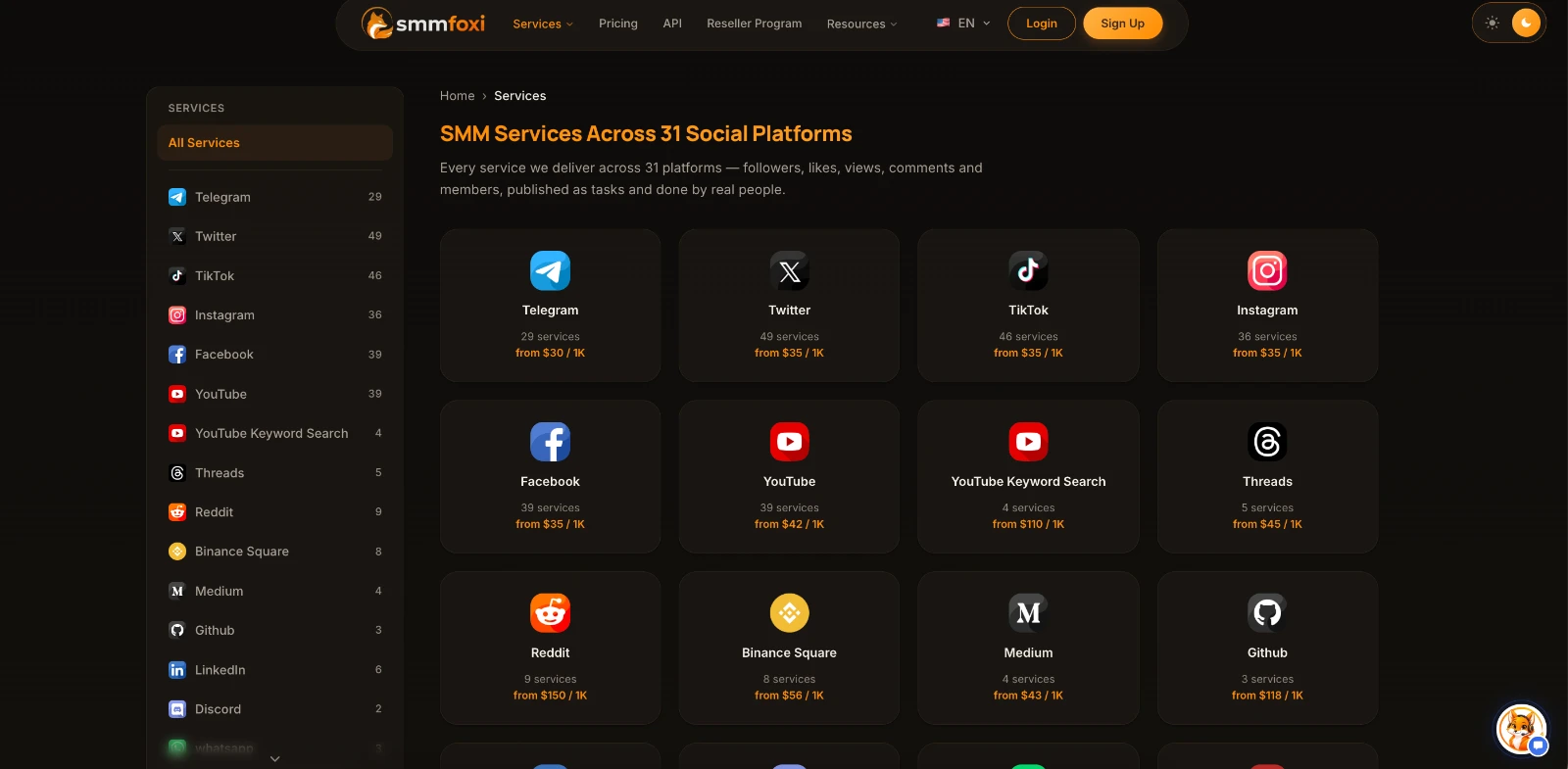
You can review the available service categories through the SmmFoxi service catalog before deciding what to offer your customers.
SmmFoxi Services: https://smmfoxi.com/services
Step 1: Create Your Account
First, register for a SmmFoxi account. The same account provides access to the website dashboard and API features.
Once registered, you can review the available services and identify which categories are relevant to your reseller business.
Registration: https://smmfoxi.com/register
Step 2: Fund Your Balance
SmmFoxi API orders are charged to your account balance. You therefore need sufficient funds before submitting paid orders.
Your integration can use the balance endpoint to retrieve available funds, but you should also maintain your own financial records and customer transaction history.
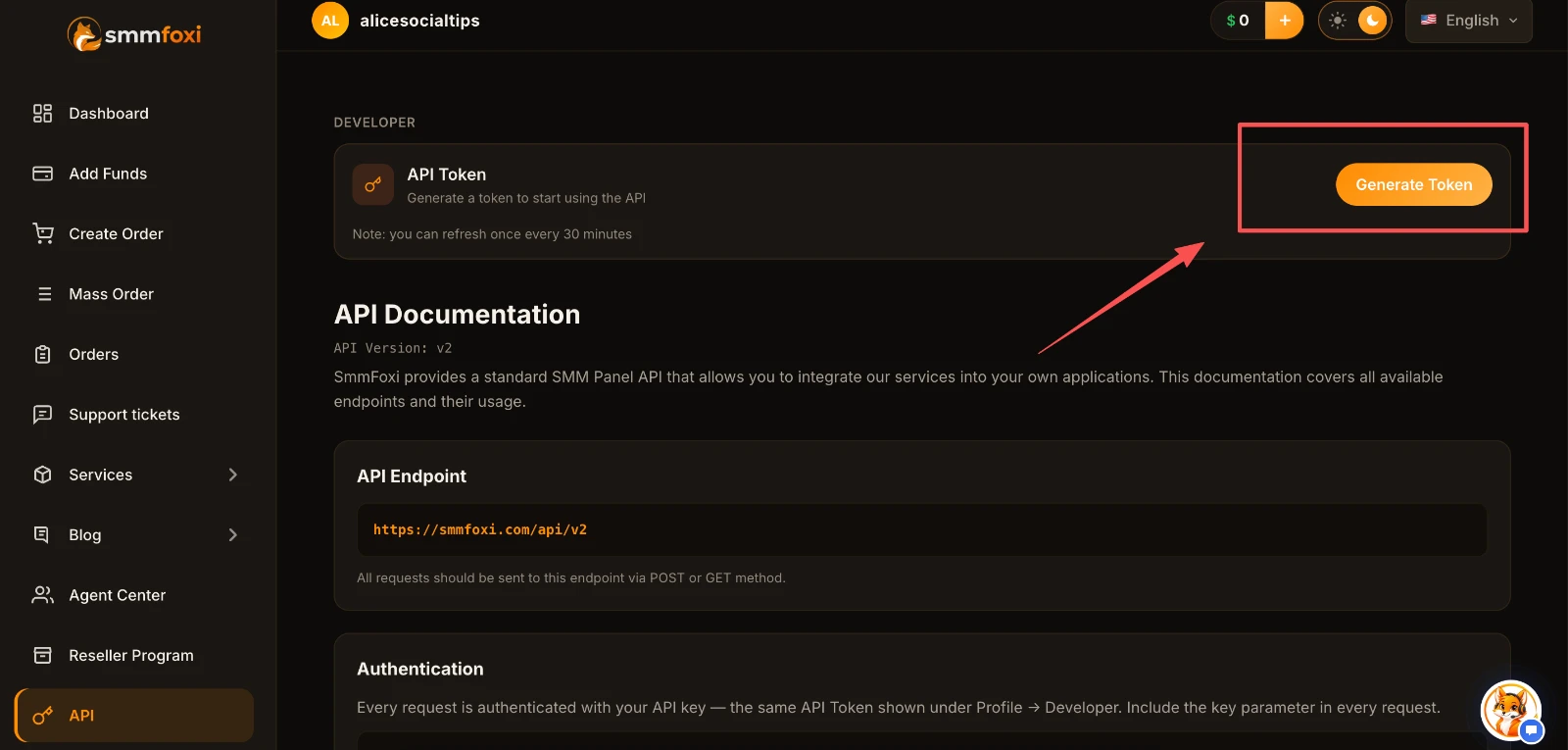
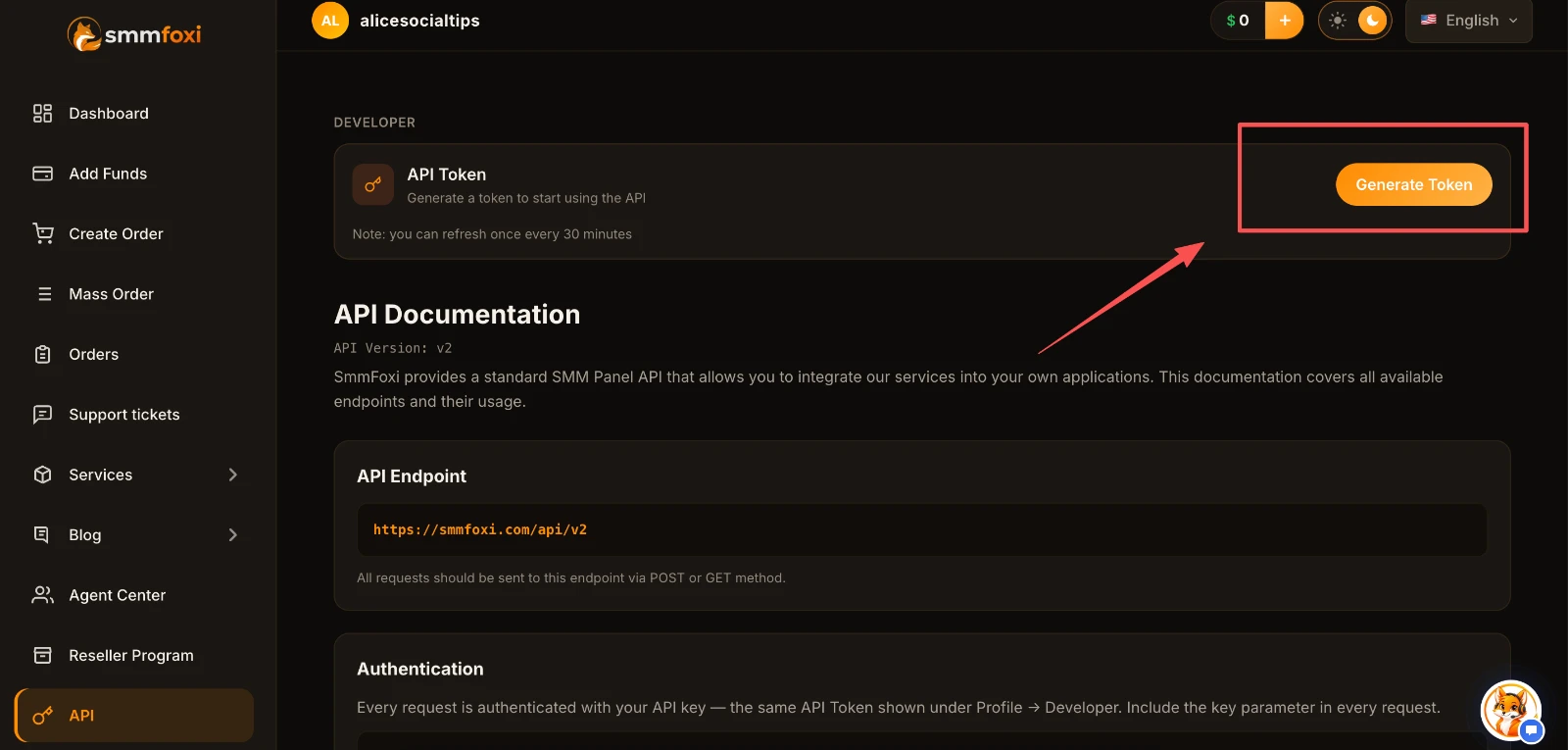
Step 3: Generate Your API Key
Open the API section of your SmmFoxi dashboard and generate an API key.
The key is used to authenticate requests. SmmFoxi displays the full key when it is generated, so store it securely.
Do not place the key in publicly accessible website code or share it with your customers. API requests should be managed securely through your backend or another protected integration environment.
Step 4: Retrieve Available Services
Before placing an order, your system needs the provider's current service information.
SmmFoxi documents an API endpoint at:
One of the supported actions is services, which returns the service catalog and relevant details.
For example, the documentation shows an authenticated request using the following fields:
{
  "key": "YOUR_API_KEY",
  "action": "services"
}
The response can be used to identify service IDs, rates, categories, and quantity limits. Your developer can then map the provider services to the products offered on your own website.
Check the official SmmFoxi API documentation for the latest request format and supported endpoints.
API Documentation: https://smmfoxi.com/docs
Step 5: Test Order Tracking
After retrieving services, test the complete workflow with a small eligible order rather than immediately connecting your full customer catalog.
For supported standard orders, the API uses the add action with the relevant service ID, target link, and quantity.
A successful order-creation response provides an order ID. The status action can then be used to check the order's progress.
Confirm that your integration handles all documented statuses correctly, including Pending, Processing, In progress, Completed, Partial, and Canceled.
For a partially completed order, the provider's documented status includes a refund for the unfulfilled portion. Your own customer-facing records should reflect the actual provider result instead of automatically treating every accepted order as complete.
Manual Ordering vs API Integration
There is no single setup that fits every reseller. Manual ordering and API integration are both valid approaches depending on the size of your business.
Manual ordering involves choosing services and submitting orders through a provider dashboard. It requires little technical setup and is often practical when you're testing a small number of services.
API integration allows your software to handle supported requests and status checks through a connection to the provider. It requires development and testing, but can reduce repetitive work as your transaction volume increases.
For new resellers, a reasonable approach is to evaluate a few services manually, understand their individual requirements, and then connect an API when your workflow justifies the additional setup.
API integration does not eliminate the need to monitor fulfillment, handle customer questions, or keep service information accurate.
Common SMM API Integration Mistakes
Even a technically working integration can create problems if the reseller ignores basic operational details.
Using outdated service IDs: A service mapping should be checked when the provider updates its catalog.
Ignoring quantity limits: Validate required fields and minimum or maximum quantities before submitting orders.
Displaying outdated prices: Review provider rates regularly and maintain your own pricing rules.
Exposing API credentials: Store API keys securely and never include them in public frontend code.
Submitting duplicate orders: Account for timeouts and uncertain responses before retrying an order-creation request.
Ignoring rate limits: Follow the documented request limits and avoid unnecessary repeated status checks.
Promising unsupported refills: Check the actual service terms before advertising refill or cancellation features.
Confusing order acceptance with delivery: An API order ID confirms that the request was registered, not that all requested activity has been completed.
Your reseller business is responsible for the experience it offers its customers. A good integration should support accurate information and clear order management, not simply process more requests.
Is SmmFoxi Suitable for API Resellers?
SmmFoxi is designed to support SMM panel owners, resellers, and agencies that need access to social media marketing services through a dashboard or API.
Its catalog covers multiple social platforms, including Instagram, TikTok, YouTube, Telegram, X, and Facebook. All SmmFoxi services are fulfilled by real users, while API v2 provides a technical interface for managing supported service requests.
Resellers can review the current service catalog, examine the API documentation, and learn about available business arrangements through the SmmFoxi reseller program.
Services: https://smmfoxi.com/services
API Documentation: https://smmfoxi.com/docs
Reseller Program: https://smmfoxi.com/how-to-earn
Before offering a service to your own customers, review its description, requirements, current rate, and applicable refill or cancellation conditions. Social media platforms have their own rules, and API availability does not guarantee a particular marketing outcome or remove account-related risks.
Frequently Asked Questions
Is an SMM panel API the same as an SMM panel?
No. An SMM panel is an interface used to browse and order social media marketing services. An SMM panel API allows software systems to exchange service data and order requests without manually using that interface for every transaction.
Do I need an API to resell SMM services?
No. You can handle orders manually through a provider dashboard. An API becomes useful when you want to connect your own website or automate repetitive order-management tasks.
Can an SMM panel API update service prices?
Many SMM APIs, including SmmFoxi API v2, provide service rates through a service-list endpoint. Your website still needs its own logic to refresh prices, apply markups, and display the correct customer-facing amounts.
Can I connect the SmmFoxi API to my website?
Yes. SmmFoxi provides API v2 documentation for connecting compatible websites, panels, and applications. You need an account, a funded balance, an API key, and an integration configured for the documented requests.
How do I track SMM API orders?
Use the order ID returned when the API accepts an order request. SmmFoxi provides a status endpoint that can retrieve progress information for individual or multiple orders.
Does every SMM API order support refills?
No. Refill availability depends on the individual service and its conditions. SmmFoxi provides refill requests for eligible services only.
Should I share my SMM API key?
No. Your API key authenticates requests to your provider account. Store it securely, keep it out of public frontend code, and do not disclose it to customers or unauthorized parties.
Get Started With SmmFoxi API
An SMM panel API can help simplify the way resellers manage service catalogs, submit orders, and monitor progress. The benefits are most noticeable when you have an established workflow and want to reduce repetitive manual tasks.
Start by selecting the services that fit your business, understanding their requirements, and testing the integration carefully.
Ready to explore the options? Create a SmmFoxi account or read the API v2 documentation to plan your integration.
Create an Account: https://smmfoxi.com/register
Read API Documentation: https://smmfoxi.com/docs